Prepare and upload
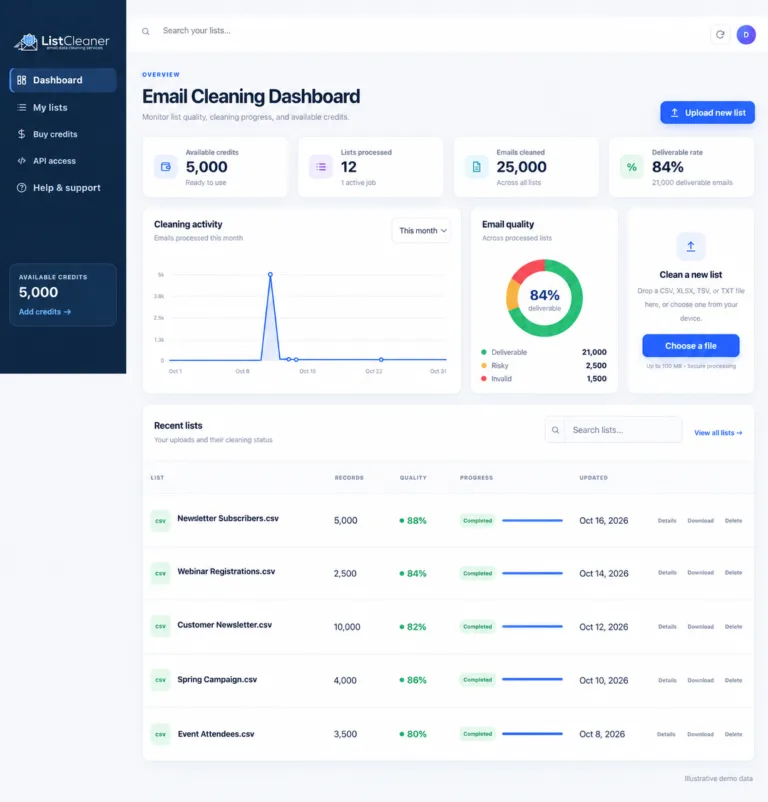
Upload a supported file, review the detected structure, select the email column and add an optional reference for your own records.

ListCleaner moves each email through a layered validation workflow, records a clear result and preserves the supporting data from your original file.
The workflow keeps upload decisions, progress and final classifications visible.
Upload a supported file, review the detected structure, select the email column and add an optional reference for your own records.
Internal intelligence and live verification signals are applied in a deliberate order, avoiding unnecessary external checks when an answer is already known.
Follow status and progress in the dashboard, inspect the quality report and download the output that matches your next step.
A correctly written address is only the beginning. Its domain may not exist, the domain may not be configured to receive mail, the provider may issue temporary inboxes or the receiving server may hide whether an individual mailbox exists. ListCleaner evaluates these signals in sequence so that one weak signal is never presented as the complete answer.
The workflow starts with fast, deterministic checks and existing internal intelligence. Live infrastructure and mailbox checks are used only when they can add useful evidence. This produces faster answers, avoids unnecessary requests and keeps classifications consistent across bulk lists and API verification.
No verification message is sent to the recipient. Results describe the technical signals available at the time of checking; they do not create consent, guarantee inbox placement or replace your bounce, complaint and suppression controls.
Read the chosen column, remove harmless surrounding whitespace and preserve the original row.
Check maintained address and domain classifications before repeating avoidable live work.
Evaluate domain, DNS and mail-routing signals that determine whether delivery is technically possible.
Return a clear reason and group the result as deliverable, risky or non-deliverable.
No single signal tells the whole story. Open any method below to understand the check, its limits and how to use the result.
Syntax validation checks whether an address follows the structural rules required for email. Addresses with…
Explore this check →Disposable email services issue short-lived inboxes that people can abandon immediately. ListCleaner compares domains with…
Explore this check →Spam traps are addresses used to identify poor acquisition or sending practices. ListCleaner checks submitted…
Explore this check →Complaint activity can affect sender reputation and inbox placement. This layer checks addresses against internal…
Explore this check →Mail exchanger records tell sending systems where a domain expects to receive email. ListCleaner checks…
Explore this check →Domain validation evaluates the domain portion of an address and its supporting DNS signals. It…
Explore this check →Catch-all mail systems can appear to accept any address at a domain, including addresses that…
Explore this check →Hard-bounce risk can come from nonexistent mailboxes, inactive accounts or permanent domain failures. ListCleaner combines…
Explore this check →Tor exit nodes can obscure the originating network of an account or submission. This method…
Explore this check →Each layer answers a different question. Together they provide the context needed to make a useful decision without overstating certainty.
Syntax validation
Is the address written in a structure that an email system can understand?
Syntax validation checks whether an address follows the structural rules required for email. Addresses with missing parts, invalid characters or impossible formatting can be classified immediately.
A malformed address cannot become deliverable later. Removing structural errors early keeps later checks focused on addresses that could genuinely exist.
Disposable emails
Does the domain belong to a service designed to create short-lived or throwaway inboxes?
Disposable email services issue short-lived inboxes that people can abandon immediately. ListCleaner compares domains with maintained internal intelligence before deeper verification.
Temporary inboxes may pass a basic format test while adding little lasting value to an account, newsletter or customer database.
Spam trap check
Is the address associated with known spam-trap or high-risk intelligence?
Spam traps are addresses used to identify poor acquisition or sending practices. ListCleaner checks submitted addresses against internal risk intelligence as one layer of the cleaning workflow.
Sending to a trap can damage sender reputation even when the rest of a list looks healthy. Validation complements—but never replaces—consent and suppression controls.
Complainers check
Is the address associated with known historical complaint risk?
Complaint activity can affect sender reputation and inbox placement. This layer checks addresses against internal classifications associated with known complaint risk.
A low complaint rate matters to mailbox providers. Separating recognized risk helps teams apply a more conservative sending policy.
MX server check
Does the domain publish usable instructions for routing incoming email?
Mail exchanger records tell sending systems where a domain expects to receive email. ListCleaner checks for usable MX information before attempting mailbox-level verification.
An address can look perfectly formatted while its domain has no working route for incoming mail.
Domain validation
Does the domain exist and provide the DNS foundation needed for email?
Domain validation evaluates the domain portion of an address and its supporting DNS signals. It helps separate active mail domains from invalid, unavailable or parked domains.
A syntactically correct address still cannot receive email if its domain does not exist or is not configured for mail.
Catch-all domain
Does the receiving system appear to accept recipients without confirming whether each mailbox exists?
Catch-all mail systems can appear to accept any address at a domain, including addresses that may not belong to a real person. That makes a definitive mailbox result harder.
Treating every catch-all response as safely deliverable hides uncertainty and can increase bounce risk.
Hard bounce check
Do the available signals indicate a permanent delivery failure?
Hard-bounce risk can come from nonexistent mailboxes, inactive accounts or permanent domain failures. ListCleaner combines earlier evidence with mailbox-level signals to classify these outcomes.
Repeated hard bounces waste sending capacity and can harm the reputation used to reach legitimate recipients.
Tor exit node check
Was relevant network activity associated with a known Tor exit node?
Tor exit nodes can obscure the originating network of an account or submission. This method adds a risk signal when relevant network information is available to the workflow.
Network anonymity is not proof of abuse, but it can be useful context in a wider fraud-prevention and account-review policy.
Results distinguish deliverable addresses from risky and non-deliverable outcomes.
An address classified as suitable for the deliverable export.
A result that deserves separate handling based on your sending policy.
An address that should not be treated as a normal deliverable mailbox.
Use the result as a data-quality decision aid, not as a substitute for permission or responsible sending.
No. Verification uses address, domain, mail-routing, risk-intelligence and mailbox-level signals without sending a verification message to the recipient.
A catch-all server can accept a test for recipients that do not actually exist. Keeping that uncertainty visible is more useful than forcing it into a misleading yes-or-no result.
Yes. Domains, DNS records, mailboxes and provider policies change. A result is a point-in-time assessment, so older or high-risk data should be checked again before an important send.
No. Deliverability and permission are separate. You still need an appropriate lawful basis, source records, an unsubscribe process and durable suppression handling.
Create an account and test the complete workflow with 100 credits.
A marketer-friendly guide to interpreting email verification results and turning each finding into a documented campaign decision.
Read article →A practical 12-step email list cleaning checklist for marketers preparing a newsletter, launch or re-engagement campaign.
Read article →Explore the new ListCleaner dashboard for uploads, cleaning activity, email-quality summaries, recent lists, credits and API access.
Read article →